SAP AI Integration: OData, BAPI/RFC and Read Replicas, Compared
Three supported ways into SAP, one to avoid, and the reasoning that decides which of the three fits a given integration.

Executive Summary
Connecting an AI layer to SAP is a solved problem, but the route matters more than most integration plans account for. SAP exposes several supported interfaces — OData services, BAPI and RFC function calls, and read replicas where direct access to the production system is restricted — and each treats SAP as a system of record the AI layer queries and writes back to, rather than something to be replaced or bypassed. What does not survive is screen-scraping the SAP GUI, which produces an integration that breaks on the next cosmetic interface change and needs constant babysitting. This is a practical guide to the three supported paths, when each fits, and why routing through SAP's own interfaces is what lets the integration survive an SAP upgrade without turning into custom ABAP your SAP partner then has to maintain.
- 3 Supported Paths
- OData services, BAPI/RFC calls, and read replicas cover the realistic access patterns for an AI layer
- 0 Custom ABAP
- Routing through SAP's published interfaces avoids code inside SAP that your SAP partner then has to maintain
- Survives Upgrades
- An integration built against OData, BAPI/RFC or a replica keeps working across SAP version upgrades
- 1 Path To Avoid
- Screen-scraping the SAP GUI breaks on the next cosmetic change and is not a supported interface
Key Takeaways
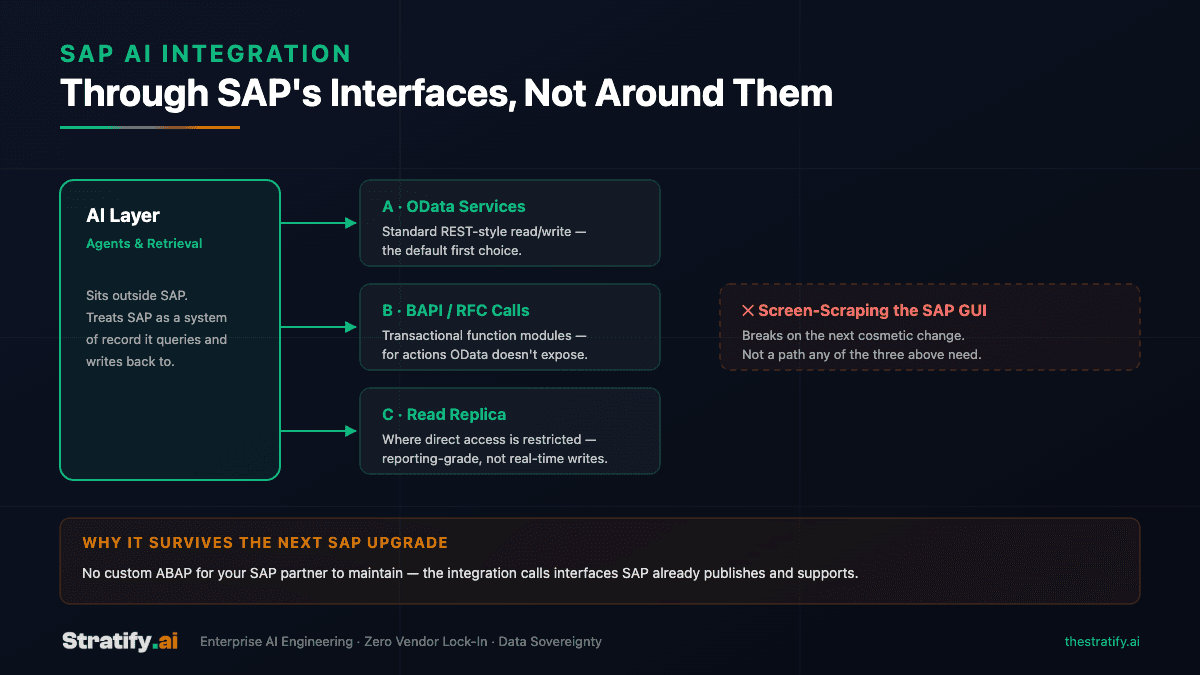
- OData services are the default first choice: a standard, REST-style interface for read and write operations against SAP business objects.
- BAPI and RFC function calls cover transactional actions that a given OData service does not expose — the two are complementary, not competing.
- A read replica is the right answer where direct access to the production SAP system is restricted, though it is reporting-grade rather than suited to real-time writes.
- Screen-scraping the SAP GUI is not a supported path: it produces an integration that breaks the moment a screen is cosmetically redesigned, with no warning before it does.
- The AI layer sits outside SAP and treats it as a system of record — nothing about this approach requires migrating data out of SAP or replacing the ERP itself.
Three ways in, and one way to avoid
SAP is not a closed system as far as integration is concerned — it publishes several interfaces specifically for external systems to read and write against it, and an AI layer is, from SAP's perspective, just another external system calling those interfaces. The three that cover the realistic set of integration needs are OData services, BAPI and RFC function calls, and read replicas for cases where direct access to production is restricted. What all three share is that the AI layer sits outside SAP entirely: SAP remains the system of record, nothing is migrated, and the integration survives an SAP version upgrade because it was never built against SAP's internals in the first place.
The path that does not belong on this list is screen-scraping the SAP GUI — automating against pixel positions and screen text rather than a published interface. It is sometimes reached for when no API appears to cover a need, but it produces an integration with no contract to rely on: the next transport, patch or cosmetic redesign can silently break it, and there is no SAP-side commitment that the screen will stay where it was.
OData services — the default first choice
SAP's OData services expose business objects — sales orders, material master records, financial documents — through a standard, REST-style interface with predictable query semantics: filtering, expansion of related entities, and both read and write operations depending on how the service is configured. For an AI layer, this is usually the first thing to check, because it requires no custom development on the SAP side if a service already exists for the object in question, and it behaves like any other REST API the rest of the integration is likely already calling.
Where OData earns its place as the default is maintainability: a service SAP publishes and versions is a contract the AI layer can rely on across upgrades, in a way a hand-built workaround cannot be.
BAPI and RFC — for what OData doesn't expose
Not every transactional action has an OData service in front of it. BAPIs (Business Application Programming Interfaces) and RFC (Remote Function Call) modules are SAP's older but still fully supported mechanism for invoking transactional logic directly — posting a goods movement, creating a purchase requisition, triggering a workflow step — and they remain the right tool where the specific action needed has no corresponding OData service, which is common for less standard or more industry-specific SAP configurations.
These are typically reached through a middleware layer or an SAP connector library rather than called raw, since BAPI/RFC calls use SAP's own remote-call protocol rather than plain HTTP. That middleware layer is exactly where an AI agent's tool-calling logic sits: the agent calls a well-defined function, and the function handles the SAP-specific plumbing underneath it.
Read replicas — where direct access is restricted
Some SAP environments — particularly larger or more tightly governed ones — restrict direct API or RFC access to the production system for good reason: an AI workload with a query pattern the SAP team has not reviewed is a real risk to a system the rest of the business depends on. In those cases, a read replica, refreshed on a defined interval, gives the AI layer a data source it can query freely without touching production load or requiring sign-off on every new query pattern.
The tradeoff is real and worth being explicit about with stakeholders: a replica is reporting-grade, not transactional. It fits retrieval, natural-language querying and dashboard use cases well — the same pattern behind the white paper on chatting with data over Odoo ERP — but it is the wrong foundation for a workflow that needs to write back to SAP in real time. Where both read and write are needed, a replica typically pairs with OData or BAPI/RFC for the write path rather than replacing it.
Why this survives the next SAP upgrade
The throughline across all three supported paths is that none of them requires custom ABAP running inside SAP itself. That matters beyond elegance: custom ABAP is code your SAP partner has to test against every future upgrade, patch and transport, and it is code that sits inside the system your ERP vendor is contractually responsible for supporting. An integration built entirely against OData, BAPI/RFC and read replicas is, from SAP's point of view, indistinguishable from any other external consumer of its published interfaces — which is precisely why it keeps working when SAP itself changes underneath it.
This is the same argument that runs through AI system integration more broadly: connect to what an enterprise already runs rather than building inside it or replacing it, so the integration is additive rather than a dependency the core system now has to carry.
Frequently Asked Questions
Through SAP's own interfaces rather than around them — OData services, BAPI/RFC calls, or a read replica where direct access is restricted. The AI layer sits outside SAP and treats it as a system of record it queries and writes back to, which means the integration survives SAP upgrades and does not require custom ABAP that your SAP partner then has to maintain.
Start with OData for anything it covers — it is the more modern, REST-style interface and the easier one to maintain long-term. Reach for BAPI/RFC specifically for transactional actions that do not have a corresponding OData service, which is common in less standard or industry-specific SAP configurations. The two are typically used together rather than as alternatives.
It depends on whether the action is a read or a write. A replica is well suited to retrieval, natural-language querying and reporting, since it takes that load off production entirely. It is not suited to real-time write-backs, since replica data lags the source by whatever the refresh interval is. Workflows needing both typically pair a replica for reads with OData or BAPI/RFC for writes.
Screen-scraping automates against pixel positions and on-screen text rather than a published interface, so it has no contract with SAP to rely on. The next transport, patch or even a cosmetic screen redesign can break it without warning. In the rare case where no OData service, BAPI or RFC covers a need, that is usually a sign to build a thin custom service layer over the SAP interfaces that do exist, rather than automate the GUI.
No. Every path described here treats SAP as the continuing system of record. The AI layer is an additional consumer of SAP's own interfaces, not a replacement for SAP or a migration of its data elsewhere. This is deliberate: the cost and risk of migrating an operational ERP is rarely justified by an AI integration project, and none of the supported access paths require it.
Related Articles

Let's Build the Future
of Enterprise AI
Have a project in mind or need expert guidance?
We'd love to hear from you.
Salah Ad Din Al Ayyubi Rd, Al Malaz,
Riyadh 12836, Saudi Arabia
Global Enterprise Partner
Empowering businesses across North America, Europe, Asia, and the Middle East.