Connecting an External AI Dashboard to Odoo with Chat-With-Data
Reading Odoo's ORM and database into an analytics layer you own, with natural-language querying on top.

Summary
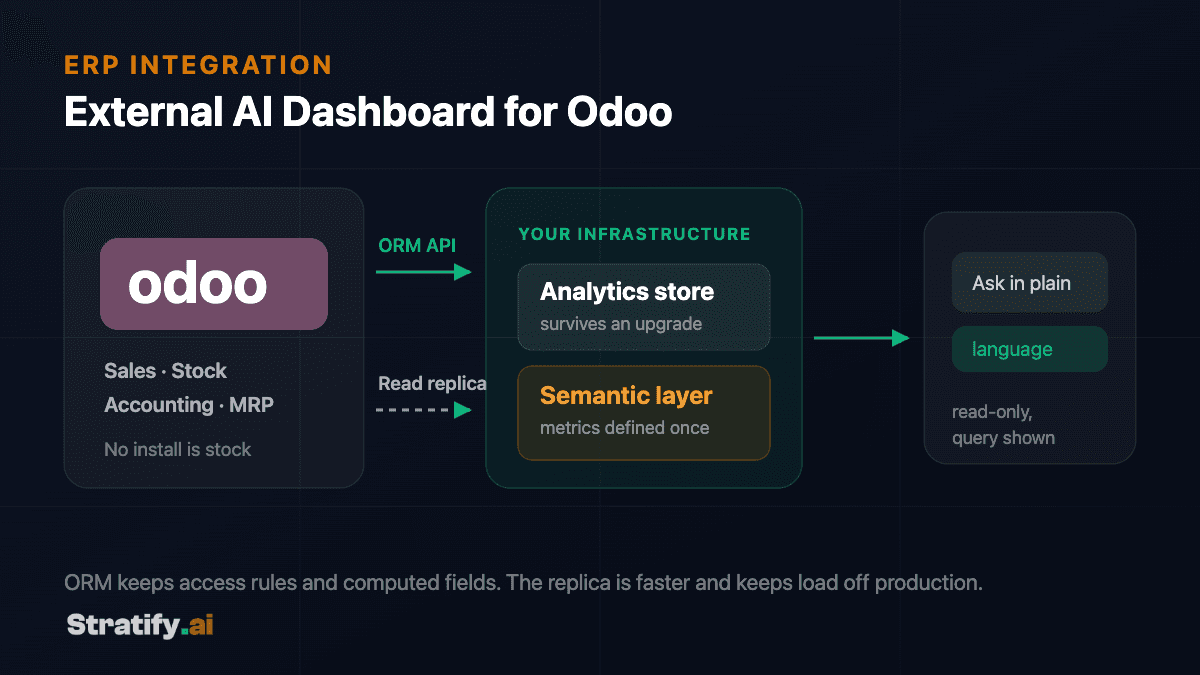
An external AI dashboard for Odoo reads data out through Odoo's ORM or a PostgreSQL read replica into an analytics store you control, models it into consistent business metrics, and puts natural-language querying over that model. Because Odoo exposes its database directly — unlike most hosted ERPs — the integration has options that suite platforms do not offer, along with a corresponding obligation to respect the ORM's semantics.
- ORM or replica
- Speed against access rules and computed fields
- Never the primary
- Analytical load belongs on a streaming replica
- Discover the schema
- Read ir.model at runtime — no install is stock
- write_date watermark
- With deletions handled separately, or totals drift
Key takeaways
- Odoo offers two extraction routes with materially different trade-offs: the ORM via XML-RPC or JSON-RPC, and direct SQL against a read replica.
- The ORM enforces access rules, computed fields and multi-company boundaries. Reading raw SQL bypasses all three, which is sometimes correct and always a decision.
- Odoo's own reporting is capable, so the case for an external layer rests on cross-source questions, metric governance and data ownership.
- Customised and third-party modules change the schema, so the integration must discover the model at runtime rather than assume a stock installation.
- A semantic layer over the extracted data is what makes natural-language querying reliable enough to expose beyond an analytics team.
Two ways out of Odoo, and when each is right
Odoo is unusual among ERPs in that self-hosted deployments give you direct access to the PostgreSQL database underneath. That creates a genuine architectural choice, and choosing without understanding the trade-off is where these projects go wrong.
The ORM route uses Odoo's external API — XML-RPC or JSON-RPC — calling model methods such as search_read through the standard endpoints. Everything the ORM does on behalf of a normal user still applies: record rules, access rights, multi-company boundaries and computed fields all behave as Odoo intends. The cost is throughput. Large extracts through the ORM are slow, and they consume application-server resources that production users are also relying on.
The direct SQL route reads from a streaming replica of the database. It is dramatically faster for bulk extraction and imposes no load on the application server. What it gives up is everything the ORM was providing: computed and related fields that are not stored do not exist in the tables, record-level access rules are not applied, and multi-company separation becomes something your queries must reimplement correctly.
The pattern that holds up in practice uses both — the replica for bulk historical extraction where volume dominates, and the ORM for models where computed fields or access semantics matter more than speed. What does not hold up is reading production's primary database directly, which puts analytical load on the instance running the business.
Customisation means you cannot assume the schema
Most production Odoo installations are not stock. Custom modules add fields and models, third-party modules from the app store alter behaviour, and studio customisations create fields that exist in one database and not another. An integration written against a documented stock schema will work in a demo instance and break on the customer's system.
The correct approach is runtime discovery. Odoo describes its own data model through ir.model and ir.model.fields, which can be queried to establish what models and fields actually exist in this specific database, including custom ones. The integration reads that description and adapts, rather than carrying assumptions.
This matters at upgrade time too. Odoo's major versions change models, and the difference between an integration that discovers the schema and one that assumes it is the difference between a configuration review and a rewrite.
- Discover models at runtime
- Query ir.model and ir.model.fields rather than hard-coding a field list from documentation.
- Expect custom fields
- Fields added through Studio or custom modules carry real business meaning and are usually the ones the client most wants reported on.
- Check whether computed fields are stored
- A non-stored computed field is invisible to SQL. If it matters, either read it through the ORM or recompute the logic deliberately.
- Handle multi-company explicitly
- In grouped deployments, company boundaries determine what any given figure means. Getting this wrong produces totals that are quietly incorrect.
Keeping the extract incremental
Odoo maintains write_date on records, which is the basis for incremental synchronisation: read only what changed since the last successful run, and advance the watermark on completion. Full extracts remain available for backfill and post-schema-change rebuilds, but they are not the routine path.
Deletions again need explicit handling. Odoo can be configured to log them, and where that is unavailable the practical alternative is periodic reconciliation of identifier sets between source and warehouse. Skipping this produces a warehouse that slowly diverges upward from reality.
A subtlety specific to Odoo: some operations update related records without touching write_date on the record you are watching. Accounting entries and stock moves are the usual culprits. Where a model has this behaviour, the sync should key off the record that actually changes rather than the one that is conceptually interesting.
The semantic layer, and why chat needs it
The reasoning here is identical to any other ERP, and worth restating because it is the step most often skipped. A language model pointed at extracted Odoo tables will generate queries that run and return numbers. It does not know which journals your organisation excludes from revenue, how you treat intercompany movements, or that a particular product category is reported separately for management purposes. The answers will be confident and wrong.
A semantic layer states those rules explicitly — entities, metrics, relationships, fiscal calendar — and the model generates queries against that model rather than raw tables. Odoo's flexibility makes this more important rather than less: two Odoo deployments in the same industry can represent the same business concept quite differently, so a definition layer is the only place the organisation's actual meaning can live.
The by-product is a written definition of the company's own metrics, which most organisations discover they have never had. The disagreements this surfaces during implementation are typically the most valuable output of the first phase.
Guardrails for query access
The query layer's credential should be read-only against the analytics store and should have no path to Odoo at all. Row and column permissions belong in the database, enforced against the identity of the person asking, so entitlement does not depend on model behaviour. Generated queries should be validated before execution, with statement types restricted and cost bounded.
Answers should expose the query that produced them and the definitions applied. Beyond audit requirements, this is what makes the tool usable: a surprising number that can be inspected gets investigated, while a surprising number that cannot gets ignored — and with it, eventually, the whole system.
What ownership means here
Because Odoo is frequently self-hosted, organisations running it have often already decided that owning their stack matters. An external analytics layer should follow the same principle: the pipeline, the semantic model and the dashboards are source code you hold, deployable in your own environment.
Practically, this means the historical record survives an Odoo major-version upgrade, a migration between hosting arrangements, or a decision to move off Odoo entirely. The analytics store is not a view into the ERP — it is an independent record that happens to be fed by it.
Two ways out of Odoo, and when each is right
Comparison of Odoo extraction routes: the ORM external API versus direct SQL against a read replica.
| Criterion | ORM (XML-RPC / JSON-RPC) | Direct SQL on a read replica |
|---|---|---|
| Throughput | Limited; large extracts are slow and load the app server. | High; suited to bulk historical extraction. |
| Computed fields | Available — the ORM computes them on read. | Absent unless the field is stored in the table. |
| Access rules | Enforced as Odoo intends. | Bypassed entirely; your queries must reimplement them. |
| Multi-company separation | Handled by the ORM. | Your responsibility, and easy to get subtly wrong. |
| Impact on production | Consumes application-server capacity. | None, provided it reads a replica and not the primary. |
| Upgrade resilience | Higher — the API is a supported interface. | Lower — schema changes between major versions are your problem. |
Frequently asked questions
For questions inside Odoo, often you should. An external layer earns its place when questions span Odoo and systems it does not hold, when metric definitions need governing across departments, or when the historical record needs to outlive the current Odoo deployment.
Reading a streaming replica is safe and standard. Reading the production primary is not — it puts analytical load on the instance running the business. The more important caveat is semantic: direct SQL bypasses record rules, multi-company separation and non-stored computed fields, so it is appropriate for bulk extraction and inappropriate wherever those semantics carry meaning.
If it discovers the schema at runtime rather than assuming it, yes — an upgrade becomes a review rather than a rebuild. Integrations that hard-code field lists from stock documentation are the ones that break, which is the main argument for the discovery approach.
Yes, through the ORM external API, which is available regardless of hosting. What you lose is the direct-replica option, so bulk historical extraction is slower and has to be paced to avoid loading the application server. The architecture is otherwise unchanged.
That is precisely what runtime schema discovery is for. Custom fields and models are read like any other, and in practice they are often the ones carrying the business logic that matters most to reporting.
Not by default, and we would advise against combining it with analytics. Read and write are different risk categories; where write-back is required it belongs in a separate component with its own credentials, approval path and audit trail.

Let's Build the Future
of Enterprise AI
Have a project in mind or need expert guidance?
We'd love to hear from you.
Salah Ad Din Al Ayyubi Rd, Al Malaz,
Riyadh 12836, Saudi Arabia
Global Enterprise Partner
Empowering businesses across North America, Europe, Asia, and the Middle East.