Connecting an External AI Dashboard to Zoho with Chat-With-Data
Reading Zoho's business applications into an analytics layer you own, with natural-language querying on top.

Summary
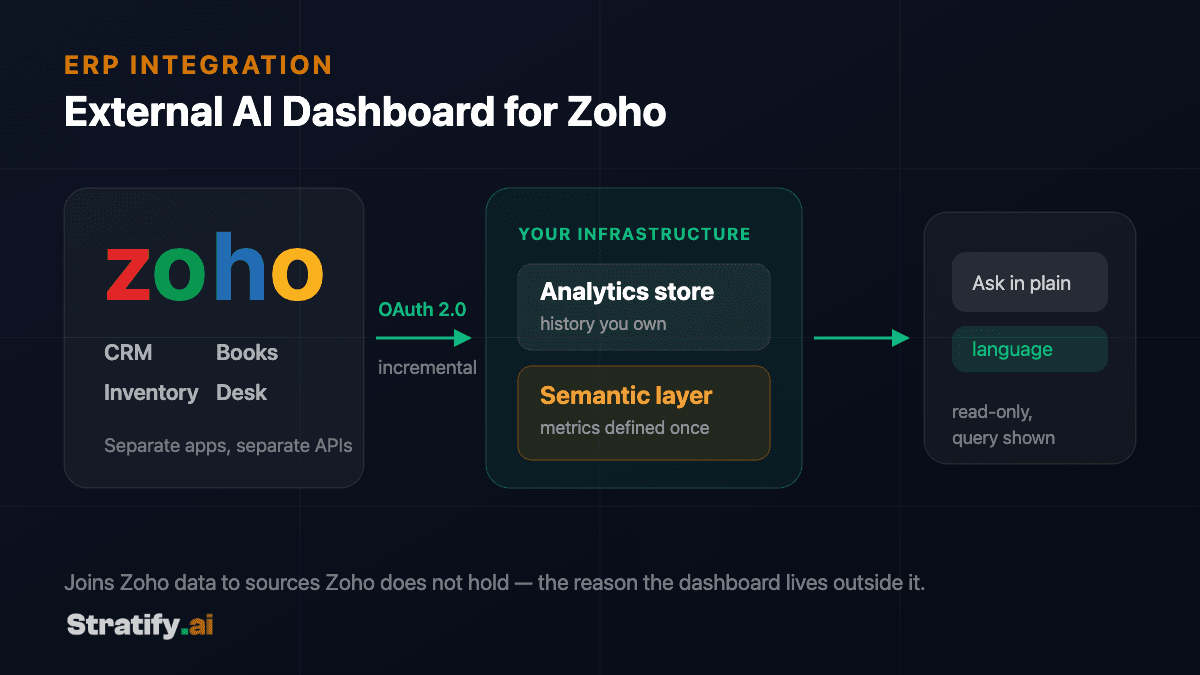
An external AI dashboard for Zoho reads data out of Zoho's APIs into an analytics store you control, models it into consistent business metrics, and puts a natural-language query interface over that model. The dashboard lives outside Zoho, which is what allows it to join Zoho data to sources Zoho does not hold and to answer questions Zoho's native reporting cannot express.
- A suite, not a database
- Four Zoho products is four integrations, not one
- Incremental or bust
- Full extracts outgrow the daily call allowance quietly
- Semantic layer first
- Chat before it produces confident, wrong numbers
- Read-only by construction
- Permissions in the database, not in the prompt
Key takeaways
- Zoho is a suite of separate applications with separate APIs, not one database — the integration reads several products, each with its own object model and rate limits.
- OAuth 2.0 with refresh tokens is the access path; the data-centre domain your organisation sits in determines which endpoints apply.
- Incremental sync on record modification timestamps is what keeps the integration inside rate limits as data volume grows.
- Chat-with-data is only as trustworthy as the semantic layer beneath it — a model generating queries against raw tables will produce confident, wrong answers.
- Read-only credentials and query-level guardrails are what make natural-language access safe to expose beyond the analytics team.
Why build outside Zoho at all
Zoho ships capable native reporting, and for questions confined to a single Zoho application it is usually the right tool. The case for an external dashboard begins where that boundary is crossed.
The first driver is cross-source questions. A question that joins Zoho CRM opportunities to delivery data from a system Zoho does not hold cannot be answered inside Zoho, because the other half of the data is not there. The second is metric consistency: when finance, sales and operations each maintain their own definition of a figure inside their own module, the organisation ends up with several numbers that all claim to be revenue. A semantic layer outside the source systems is where a single definition can actually live.
The third is ownership. An external analytics store means the historical record persists on infrastructure you control, in a form that survives changing a module — or changing suite vendors entirely.
Understanding what you are integrating with
The most common planning error is treating Zoho as a single system. It is a suite: CRM, Books, Inventory, Desk, People and Projects are separate applications, each with its own REST API, its own object model, and its own rate limits. An integration covering four Zoho products is four integrations that happen to share an authentication mechanism.
Authentication is OAuth 2.0. A self-client registration in the Zoho API console yields a refresh token, exchanged for short-lived access tokens at request time. Scopes are granular and per-application, and requesting only read scopes for the modules actually in use is both good practice and something a security review will ask about.
One detail catches most first integrations: Zoho operates regional data centres, and the API domain differs between them. A token issued in one region will not authenticate against another region's endpoints. The correct domain is determined by where the organisation's account lives, and it must be configuration rather than a hard-coded constant — a multi-entity group may span more than one.
Rate limits are enforced per organisation per day and vary by plan. This is the constraint that shapes the sync strategy more than any other.
- Zoho CRM
- Accounts, contacts, deals and pipeline history. Usually the first module integrated and the one with the most custom fields to map.
- Zoho Books
- Invoices, bills, payments and chart of accounts — the source for anything financial, and the module where period-close timing matters most.
- Zoho Inventory
- Stock levels, movements and fulfilment. Frequently the module that has to be joined to a non-Zoho system to be useful.
- Zoho Desk / People / Projects
- Support, HR and delivery data, typically added after the commercial modules once the core model is proven.
Getting data out without exhausting the rate limit
A naive integration re-reads everything on a schedule. It works during a proof of concept with a small dataset and fails quietly in production, because the record count grows until a full extract can no longer finish inside the daily call allowance.
The durable pattern is incremental. Records carry modification timestamps, and the sync requests only records changed since the previous successful run, storing that watermark on completion. The full extract is retained as a deliberate operation — used for backfill or after a schema change — rather than as the routine path.
Deletions need separate handling, because a deleted record does not appear in a modified-since query. Zoho exposes deletion information separately, and an integration that ignores it accumulates records in the warehouse that no longer exist in the source. This surfaces as totals that drift upward over months and is unpleasant to reconcile retrospectively.
Bulk read APIs matter for the initial load. Requesting hundreds of thousands of records page by page through the standard API will consume the allowance long before it finishes; the bulk endpoints exist precisely for this and should be used for backfill even though they are asynchronous and more work to implement.
The semantic layer is what makes chat trustworthy
Pointing a language model at raw synced tables and inviting questions produces a demo that impresses in a meeting and misleads in production. The model does not know that your organisation excludes intercompany invoices from revenue, that opportunities in a particular stage are not counted as pipeline, or that one entity's fiscal year does not start in January. It will generate a query that is syntactically valid, returns a number, and is wrong — with no signal that anything went awry.
The semantic layer is where those rules are written down once, as explicit definitions of entities, metrics and their relationships. Revenue is defined. Active customer is defined. The fiscal calendar is defined. The model then generates queries against those definitions rather than against raw tables, which narrows the space of possible answers to those the business considers correct.
This has a second benefit that matters more over time than accuracy in the moment: it is a written record of what the organisation means by its own metrics. Most companies have never had that written down anywhere, and the disagreements it surfaces during implementation are usually worth the discomfort.
Guardrails for exposing natural-language querying
Opening query access beyond a small analytics team changes the risk profile, and the controls belong in the architecture rather than in the prompt. A model instructed politely not to read salary data is not a security measure.
The credential the query layer uses should be read-only against the analytics store, never against Zoho itself. Row and column permissions should be enforced by the database for the identity of the person asking, so a question about compensation from someone without that entitlement returns nothing regardless of how it is phrased. Generated queries should be validated before execution, with statement types restricted and cost or row limits applied.
Every answer should be able to show its work — the query that produced it, and the definitions it relied on. This is what allows a user to challenge a surprising number rather than either accepting it uncritically or discarding the tool. It is also, in practice, what regulators and auditors ask for.
- Read-only by construction
- The query identity has no write capability anywhere in the stack.
- Permissions enforced in the database
- Row and column access follows the asking user's identity, not the model's instructions.
- Generated queries are validated
- Statement type, scanned volume and row count are bounded before execution.
- Answers cite their query
- The user can inspect exactly how a number was produced and which definitions applied.
Sequencing the work
The order that tends to hold up: authenticate and read one module end to end; model that module's core entities properly; build the handful of dashboards people actually asked for; then add natural-language querying over the model that now exists. Adding chat before the semantic layer is the shortcut that produces the confident wrong answers described above.
Additional modules and non-Zoho sources extend a working model rather than reopening the architecture, provided the first module was modelled with more than itself in mind. This is the main reason to spend longer than feels necessary on the initial data model.
The semantic layer is what makes chat trustworthy
Comparison of natural-language querying with a semantic layer, direct text-to-SQL against raw tables, and Zoho's native reporting.
| Criterion | Chat over a semantic layer | Text-to-SQL on raw tables | Zoho native reports |
|---|---|---|---|
| Metric consistency | Definitions are declared once and every answer uses them. | The model infers intent per question; two phrasings can yield two numbers. | Consistent within a module, divergent across modules. |
| Cross-module questions | Supported — relationships between modules are modelled explicitly. | Possible, but join correctness depends on the model guessing right. | Limited; each application reports on its own data. |
| Non-Zoho sources | Joined in the same model as any other source. | Only if they happen to be in the same database. | Not available. |
| Wrong-answer risk | Bounded by the definitions; unanswerable questions can be refused. | Unbounded — a plausible wrong number looks identical to a right one. | Low, but the range of expressible questions is narrow. |
| Auditability | The generated query and the definitions behind it can both be shown. | The query is visible; the reasoning behind the joins is not. | Report configuration is inspectable. |
Frequently asked questions
It addresses a different scope. Zoho Analytics is well suited to reporting within the Zoho ecosystem. An external layer is what you build when questions span Zoho and non-Zoho systems, when metric definitions need to be shared across modules, or when the historical record needs to sit on infrastructure you own.
It depends on sync frequency, which is bounded by API rate limits rather than by the pipeline. Frequent incremental syncs on high-value modules with less frequent cycles elsewhere is the usual compromise. Genuinely real-time reporting is rarely the actual requirement — worth confirming before designing for it, because it materially raises cost.
Zoho versions its APIs and deprecates on published timelines. The integration targets a specific version and is updated deliberately. Because the sync layer is one component rather than logic scattered across reports, a version change is a contained update — and since you hold the source code, it is not gated on our availability.
Technically possible and deliberately not the default. Analytics and write access are different risk categories, and combining them means a query bug becomes a data-integrity incident. Where write-back is genuinely required, it belongs in a separate component with its own credentials, approval path and audit trail.
In whatever environment you choose, including on-premise or a private cloud region. For organisations with data residency obligations this is decided at the start, because it constrains both the analytics store and which models can be used for the query layer.
No — that is the point of the query interface. In practice organisations keep both: natural language for exploratory questions, and curated dashboards for the metrics people check routinely. The two serve different needs and neither fully replaces the other.

Let's Build the Future
of Enterprise AI
Have a project in mind or need expert guidance?
We'd love to hear from you.
Salah Ad Din Al Ayyubi Rd, Al Malaz,
Riyadh 12836, Saudi Arabia
Global Enterprise Partner
Empowering businesses across North America, Europe, Asia, and the Middle East.