








AI Workforce Enablement — Saudi Arabia & GCC

The Licences Are Already Bought. The Productivity Isn't.

Most organisations are further behind on AI than their software spend suggests: the tools are deployed, and nobody was trained to use them on real work. Every quarter that gap stays open is productivity your competitors are compounding and you are not. We close it — role by role, on your own workflows, in Arabic or English.

Stratify Agent

Ask about deployment, cost or governance

Hi! I am the Stratify AI Enablement Agent. Ask me anything about getting your teams trained and productive with the AI tools you already have.

What is AI workforce enablement?

AI workforce enablement is training the people in an organisation to use AI competently and safely on their own day-to-day work. It is a different thing from buying AI tools and a different thing from building AI systems — it is the part that decides whether either of those produces any return.

It is also not a generic prompt-engineering course. The useful version is taught on the organisation's own workflows, in the tools it has already licensed, split by role — because what a finance controller needs to know is not what a support agent needs to know — and it spends as much time on judgement as on capability: how to tell when the output is wrong, what must never be pasted into a public tool, and when the correct move is to stop and involve a person.

Programme duration
Most run two to six weeks, scheduled around operational load rather than taking teams offline.
Who attends
Executives, managers and the staff doing the work — in separate tracks, because each group decides different things.
How it is delivered
On site, remote or blended, in Arabic or English, using your own systems, documents and live tasks.
How it is judged
Adoption and time saved in named workflows, measured against a baseline taken before the programme starts.
PEOPLE WHO CAN DIRECT AI, NOT JUST SWITCH IT ON

Trained People.
Not Trained Models.

We do not train models here — we train the people who have to work alongside them, on your own workflows, so teams end up AI-enabled and work-ready rather than licensed and idle.

01
AI training built on your own workflows
WORK-READY

Trained On
Your Actual Work

Generic AI courses teach generic prompting. We train your teams on the processes they run every day, using the systems and documents they already work in.

  • Built On Your Processes
  • Arabic And English Delivery
  • Role-Specific Tracks
See the approaches
02
Training teams to judge and verify AI output
JUDGEMENT

Know When
Not To Trust It

The skill that matters most is knowing where these systems are unreliable. Teams learn to check, challenge and escalate rather than accept whatever the screen returns.

  • Verification Habits
  • Safe Handling Of Data
  • Knowing When To Escalate
Talk to sales
03
Workforce AI training built around real workflows
WORKFORCE

Teams That
Actually Use It

Most AI licences go unused because nobody connected them to real work. Training is built around your workflows, for the people who do them daily.

  • Built On Your Workflows
  • Hands-On, Not Theory
  • Adoption You Can Measure
Talk it through
04
AI capability that scales across departments
COMPOUND

Fluency That
Compounds

Once a team can direct and supervise these systems, that capability carries into every department — with no per-seat licensing and no ceiling.

  • Scales Across Teams
  • No Per-Seat Ceiling
  • Capability You Keep
Talk it through
Separate tracks, because each group decides different things

The Programmes

Programmes that train only the people doing the work tend not to change anything — the workflow, the targets and the review process are all still designed for how the job was done before.

Executive and board AI briefings

Executive & Board Briefings

Where AI genuinely applies in your sector, where it does not, and what a leadership team is accountable for once it is in the building.

Where It Applies
What To Fund First
Governance Duties
Realistic Timelines
Manager AI enablement programme

Manager Enablement

The layer that decides whether adoption sticks. Managers learn to spot automatable work, redesign the workflow around it, and supervise AI-assisted output.

Spotting The Work
Redesigning Workflows
Reviewing AI Output
Handling Team Concerns
Role-based AI practitioner training tracks

Role-Based Practitioner Tracks

Separate hands-on tracks for sales, finance, HR, operations and support — each built on that team's own tasks, documents and tools.

Sales & CRM
Finance & Reporting
HR & Recruitment
Operations & Support
AI safety, judgement and data handling training

Judgement, Safety & Data Handling

What not to paste into a public tool, how to verify output before acting on it, and when the right answer is to stop and ask a person.

Verifying Output
Confidential Data Rules
Knowing When To Escalate
Written Usage Policy
Internal AI champions train-the-trainer programme

Internal Champions

A small group trained to carry it after we leave — so capability compounds inside the organisation instead of depending on us coming back.

Train The Trainer
Reusable Materials
Internal Support Channel
Onboarding New Joiners

Custom Programs

Bespoke curricula for organizations preparing for large-scale AI adoption.

Tailor-Made

Built for your unique workflows

Any Data / System

Connects with tools & databases

Multi-language

Arabic, English, and beyond

Scalable by Design

Start small, scale effortlessly

OUR PROCESS

From Idle Licences to Measured Productivity

Training that stops at the workshop changes nothing by Monday. Stage four is the one that decides whether any of it sticks.

01

Baseline The Gap

Find out what is really happening.

We look at which tools are licensed, who actually opens them, and where the hours are going in the workflows that matter.

  • Licence vs. Usage Audit
  • Workflow Time Baseline
  • Skills Gap By Role
  • Success Measures Agreed
02

Design The Tracks

Your work, not a generic syllabus.

We build role-specific curricula around your real tasks, using your own documents, systems and terminology.

  • Role-Based Curricula
  • Your Own Materials
  • Arabic Or English
  • Usage Policy Drafted
03

Train In Cohorts

Hands on their own work.

Small cohorts work through real tasks from their own queue, scheduled around operational load rather than pulling teams offline.

  • Small Group Sessions
  • Live Tasks, Not Exercises
  • On Site Or Remote
  • Practice Environment
04

Embed In The Work

Where most training quietly dies.

A supported period after the sessions, applying it to live work, because a workshop that ends on Friday changes nothing by Monday.

  • Post-Session Support
  • Manager Check-Ins
  • Workflow Adjustments
  • Blockers Cleared
05

Measure & Sustain

Prove it, then keep it.

We report adoption and time saved against the baseline from stage one, and hand over to your internal champions.

  • Adoption Reporting
  • Time Saved vs. Baseline
  • Champions Handover
  • Refresh For New Joiners
Security & Compliance First
Your Data Stays Yours
Source Code & IP Handed Over
No Lock-in, Ever
Training Infrastructure Built for Enterprise

How It Is Delivered

Tools We Train On

  • Claude, ChatGPT and Copilot
  • whatever your organisation has already licensed

In Your Own Systems

  • CRM, ERP and helpdesk workflows
  • your documents and templates

Delivery Formats

  • On site
  • remote
  • blended cohorts scheduled around operational load

Practice Environment

  • Sandboxed accounts using safe copies of real work

What You Keep

  • Written usage policy
  • role playbooks
  • recorded sessions
  • onboarding pack for new joiners

Measurement

  • Adoption tracking
  • time saved against a pre-programme baseline

Languages

  • Delivered in Arabic, English, or both in the same room
How the options differ

Role-Based Enablement vs. The Alternatives

Most organisations trying to close this gap are choosing between three things. They differ in what actually changes on Monday morning.

Comparison of role-based AI workforce enablement, generic online AI courses, and vendor product training across what is taught, whose workflows are used, judgement and safety coverage, what happens after delivery, and how results are measured.
Comparison criterionRole-based enablementGeneric online courseVendor product training
What is taughtYour workflows, in the tools you already pay for.General technique, illustrated with someone else's examples.That vendor's features, as the vendor sees them.
Whose work is practised onReal tasks from the attendee's own queue.Sample exercises with no consequence attached.Demo data inside the product.
Who it is built forSeparate tracks for executives, managers and practitioners.One track, whoever signs in.Whoever administers or uses that product.
Judgement and safetyCore content — verification, confidential data, when to escalate.Usually a module, often skipped.Covers the product's own controls, not your obligations.
After the sessions endA supported embedding period, then internal champions carry it.A certificate and a completion rate.Support tickets against that product.
How results are judgedAdoption and time saved against a pre-programme baseline.Course completions.Seat activation and feature usage.
LanguageArabic, English, or both in the same room.Typically English, sometimes subtitled.Whatever the vendor localises.

These are not mutually exclusive — a generic course is a reasonable primer and vendor training is worth doing for a tool you have standardised on. The comparison describes what each is designed to change, not measured outcomes.

What it costs

Priced Around Your Teams and Their Roles

Training engagements vary too much to put a number on a web page honestly. What drives the cost is how many people are being trained, how many roles need their own track, how deep each one goes, and whether delivery is on site, remote or a mix.

Talk to sales and we will put together a package for your organisation rather than fit you to someone else’s.

Request a package
Where enablement gets applied

Worked Scenarios

Three situations we see repeatedly across GCC enterprises, and what closing the gap actually involves.

Illustrative scenarios. These are composite examples showing how this service is typically applied. They do not describe specific client engagements and are not case studies.

STALLED ADOPTION

Licences bought across the organisation, opened by almost nobody

Situation
An enterprise rolls out AI seats company-wide. Months later, usage reports show a small cluster of enthusiasts and a long tail who logged in once.
Approach
Start from the workflows rather than the tool: baseline where hours actually go, then train each role on their own recurring tasks, in the tool already licensed.
What changes
Usage becomes something the work pulls rather than something the rollout pushed, and the seats already being paid for start returning something.

SHADOW USAGE

Staff already using AI, with nobody governing how

Situation
People have quietly adopted public AI tools to get through their workload, pasting in whatever the task requires — including material that should never leave the organisation.
Approach
Meet it head on rather than banning it: a written usage policy, a sanctioned environment, and training on what may and may not be shared, plus how to verify what comes back.
What changes
The productivity people found on their own stops being a data exposure, because it happens inside rules everyone has actually been taught.
MANAGER LAYER

Teams trained, managers left out, nothing changes

Situation
Staff attend AI training and return to workflows, targets and review processes designed for how the work was done before, so the new capability has nowhere to go.
Approach
Train the manager layer to redesign the work around what their team can now do, and to supervise AI-assisted output rather than waving it through.
What changes
The capability reaches the process instead of stopping at the individual, which is where most enablement programmes quietly fail.

White Papers

Paper
Summary & Detail
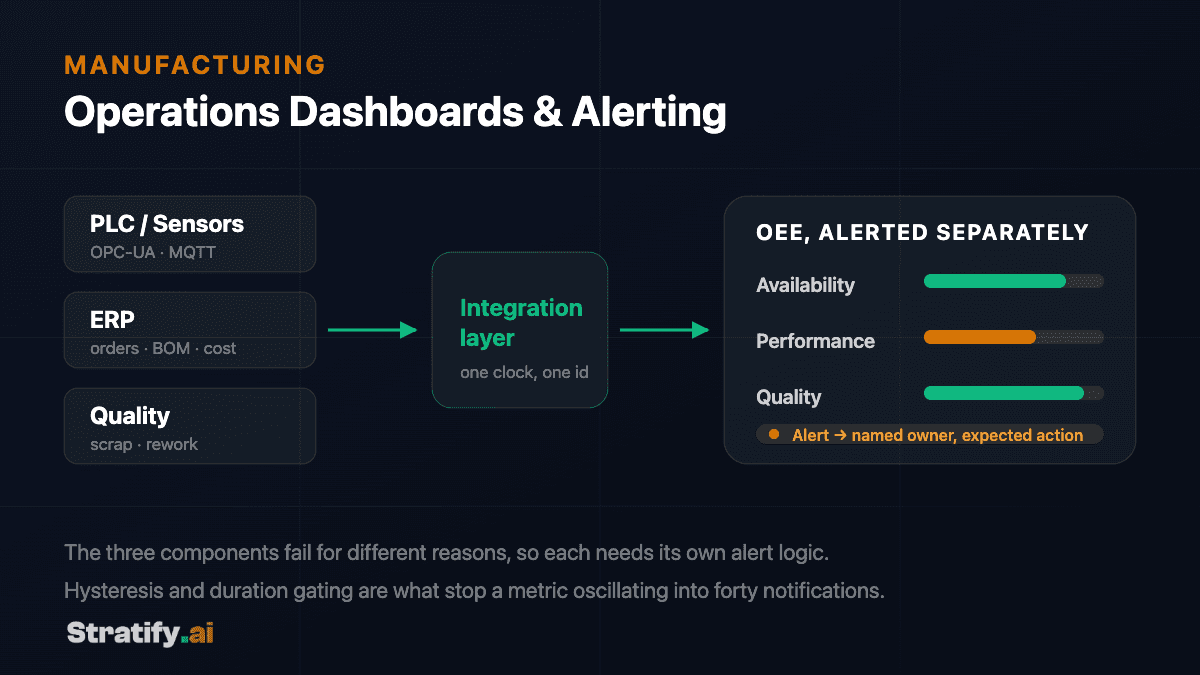
Diagram: PLC sensors, ERP and quality data feed an integration layer into a manufacturing operations dashboard, with availability, performance and quality alerted separately to a named owner.

Paper

Automated Operations Dashboards and Alerting for Manufacturers

Topic

Manufacturing

An automated operations dashboard for a manufacturer pulls live data from production systems, the ERP and plant-floor equipment into a single view, and pairs it with alerting that notifies a named person when a metric crosses a threshold that matters. The distinguishing feature is not the charts — it is that the system decides what deserves attention, rather than leaving that judgement to whoever happens to be looking at the screen.

Alert the components
Not composite OEE — the three parts fail for different reasons
Hysteresis + gating
What stops a metric oscillating into forty notifications
Owner and action
Required on every rule, or it is a status update
Rules over models
AI earns anomaly detection, not working thresholds

Frequently Asked Questions

Your staff. This service is workforce enablement — getting the people who do the work confident and competent with AI in their actual day-to-day. Building AI systems is separate work; if what you need is an application or an autonomous agent, that is our applications and agents practice, and we will say so rather than sell you training that will not fix it.

It is the most common situation we are called into, and yes. Low usage is almost never a tooling problem — it is that nobody connected the tool to the work people are actually measured on. We start by baselining which licences are open and where the hours really go, then train each role on their own recurring tasks in the tool you already pay for. The seats stop being a sunk cost because the work itself starts pulling on them.

Most programmes run two to six weeks end to end. Sessions are delivered in small cohorts and scheduled around operational load rather than taking teams offline for days — the point is that people practise on live work from their own queue, so the time is not lost to a classroom in the first place.

No. Prompting is perhaps a fifth of it, and it is the part that dates fastest. The rest is knowing which of your tasks are worth pointing AI at, how to verify output before acting on it, what must never be shared with a public tool, how to redesign a workflow around a capability the team did not have last year, and when the right answer is to stop and involve a person.

Three groups, in separate tracks, because each decides different things. Executives need to know where AI applies in your sector, where it does not, and what they are accountable for. Managers are the layer that determines whether adoption survives, so they learn to redesign work and supervise AI-assisted output. Practitioners train on the tasks in their own role. Programmes that train only the third group tend not to change anything.

We take a baseline before the programme starts — which tools are actually opened, and how long specific workflows take today — and report against it afterwards. Adoption and time saved in named workflows, not course completions or satisfaction scores, which measure whether people attended rather than whether the work changed.

Assume it is happening, because it usually is, and treat it as a governance gap rather than a discipline problem — people reached for it because the workload made it rational. We help you put a written usage policy in place, provide a sanctioned environment, and train everyone on what may and may not be shared and how to check what comes back. Banning it without offering a route tends to move the behaviour out of sight rather than stop it.

Yes — in Arabic, in English, or bilingually in the same room, which is often what a GCC enterprise actually needs. Materials, exercises and the usage policy you keep afterwards are produced in the language your teams work in.

A written AI usage policy, role playbooks for the workflows covered, recorded sessions, an onboarding pack so new joiners can be brought up to the same standard without us, and a trained group of internal champions. The intent is that capability compounds inside your organisation rather than depending on us returning.

Only enough to make the training real. We work from your documents, templates and workflows, and cohorts practise in sandboxed accounts on safe copies of genuine work rather than invented exercises. We do not need production write access, and nothing your teams work on during a programme is retained by us or used elsewhere.

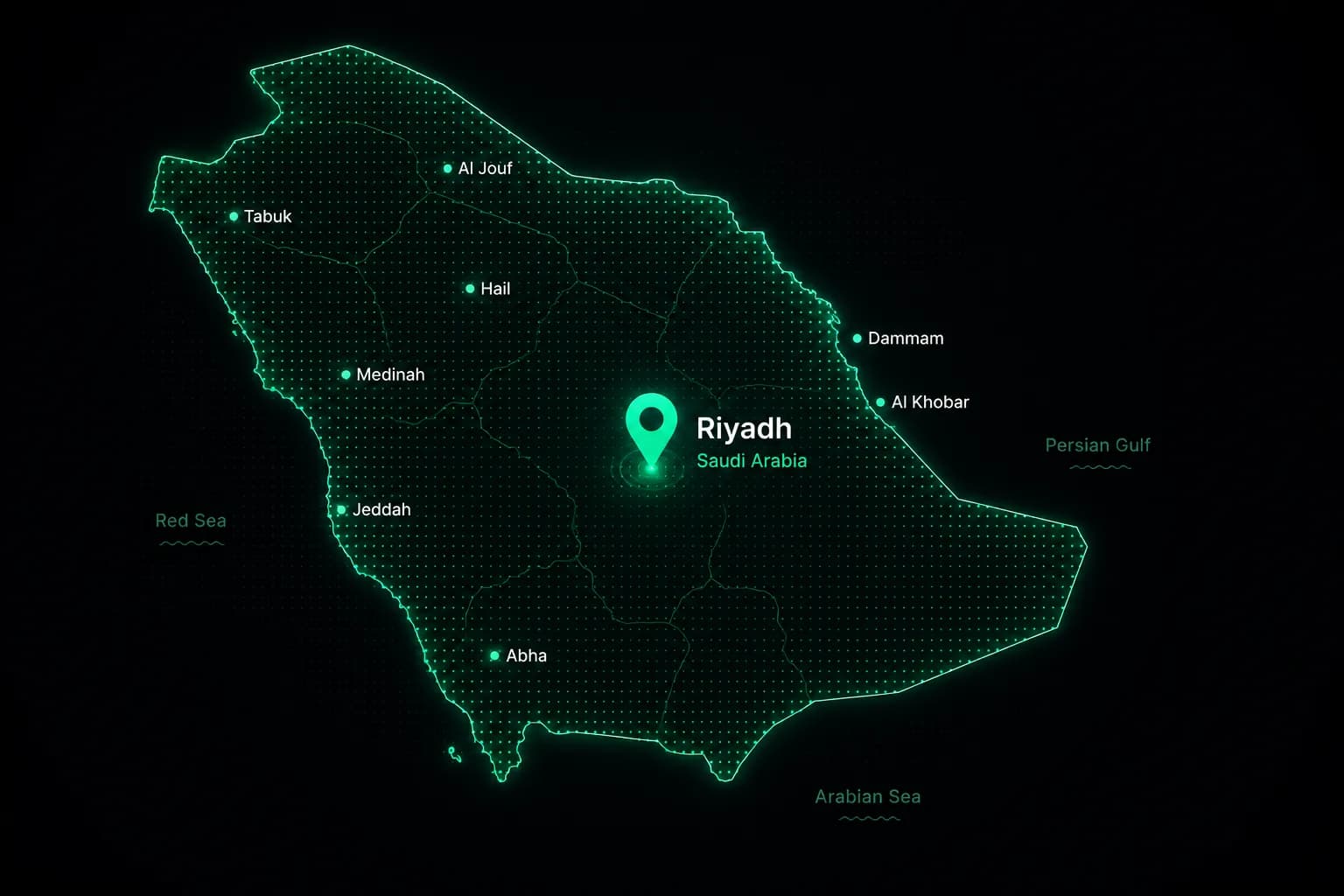
Riyadh Skyline
CONTACT US

Let's Build the Future
of Enterprise AI

Have a project in mind or need expert guidance?
We'd love to hear from you.

GLOBAL HEADQUARTERS
Stratify AISecond Floor, Diamond Building,
Salah Ad Din Al Ayyubi Rd, Al Malaz,
Riyadh 12836, Saudi Arabia
EMAIL
[email protected]
PHONE
+966 54 688 0286
Global Reach Map
Global NetworkWorldwide Presence

Global Enterprise Partner

Empowering businesses across North America, Europe, Asia, and the Middle East.

Send Us a Message

An engineer replies within one working day — not a sales sequence. No newsletter, no cold calls.

Your information is secure and never shared.